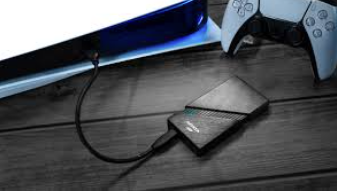
When it comes to PlayStation gaming, one of the most common questions players ask is, “can you play ps5 games on external ssd?” With the rising popularity of solid-state drives, many gamers are eager to expand their storage without compromising performance. The PlayStation 5’s cutting-edge architecture, however, has specific requirements that determine how games are stored and played. In this article, we’ll break down how PS5 storage works, the role of external SSDs, and what you need to know before investing in one.
Overview of PS5 Storage Architecture
The PlayStation 5 (PS5) features a custom-built storage system designed to deliver true next-generation gaming performance. Its architecture combines ultra-fast internal storage with flexible expansion options for convenience and efficiency. Here’s an overview of how it works:
- Internal NVMe SSD (Built-In)
The PS5 comes with a built-in 825 GB NVMe SSD, specially designed for next-gen gaming. It provides near-instant loading, smooth streaming of game assets, and seamless gameplay.
- Usable Space: About 667 GB is available for games and apps after system files.
- Speed: Up to 5.5 GB/s for fast loading and smooth gameplay.
- M.2 SSD Expansion (Internal Upgrade)
- Expandable Storage: The PS5 supports compatible M.2 NVMe SSDs ranging from 250 GB to 8 TB, allowing users to expand internal storage.
- Play Directly from Drive: Games stored on a compatible M.2 SSD perform just like those on the internal drive.
- Speed Requirements: To meet PS5 performance standards, the M.2 SSD must have a minimum read speed of 5,500 MB/s.
- External USB Storage (HDD or SSD via USB 3.2 Gen2)
- Storage for PS5 Games: External drives can store PS5 games, but cannot run them directly. They’re useful for transferring or backing up titles.
- Playable PS4 Games: PS4 games can be played directly from external USB drives, with SSDs offering significantly faster load times than HDDs.
- Additional Uses: External SSDs are great for backups, media storage, and managing large game libraries without filling up the internal SSD.
The PS5’s storage system is designed for speed and efficiency. The internal and M.2 SSDs deliver the high-speed performance needed for PS5 games, while external SSDs provide an easy way to add extra storage, back up data, and play PS4 games.
Can You Play PS5 Games on an External SSD?
No, you cannot play PS5 games directly from an external USB SSD or any external USB storage. While you can store PS5 games on these drives, you must transfer them back to the internal SSD or a compatible M.2 NVMe SSD to play.
What You Can Do With External USB Storage
- Store PS5 Games: Move or archive PS5 games to an external SSD to free up space on the internal drive.
- Transfer Games Back to Play: To play a stored PS5 game, copy it back to the internal or M.2 SSD.
- Play PS4 Games Directly: PS4 titles can run directly from an external USB drive, with SSDs offering faster load times than traditional HDDs.
Why PS5 Games Require Internal or High-Speed SSDs
PS5 games use the ultra-fast internal SSD for instant loading and smooth gameplay. Even fast USB-connected SSDs cannot match these speeds, so PS5 games cannot run directly from external drives.
Benefits of Using an External SSD
Adding an external SSD to your PS5 can enhance your gaming experience and simplify storage management. Here’s why it’s useful:
- Expand Storage Without Opening Your PS5
You can add more storage to your PS5 easily with an external SSD. It doesn’t require opening the console or voiding the warranty, just plug it in and start using it.
- Keep Internal Storage Free for Active Games
Store less-played games on an external SSD to keep the internal SSD free for active titles, ensuring fast load times and optimal performance.
- Faster Transfers Than Downloads
Copying games from an external SSD to your PS5’s internal drive is much faster than downloading them.
- Portable and Convenient
External SSDs are small and lightweight, so you can easily take your game library to a friend’s house or another PS5. You can play your games without re-downloading or setting them up again, making gaming hassle-free.
- Organize Your Game Library
Storing PS4 games on an external SSD helps keep your internal storage dedicated to PS5 titles, making your library easier to manage and ensuring next-gen games run at full performance.
Using an external SSD with your PS5 is an easy and affordable way to add more storage, transfer games faster, organize your library, and keep your console running smoothly.
Tips for Choosing and Using an External SSD
When choosing an external SSD for your PS5, focus on these key factors to ensure smooth performance and easy storage management:
- Storage Capacity
Choose based on your game library size:
- 1 TB is sufficient for smaller collections or mainly PS4 games.
- 2 TB or more is ideal if you store multiple large PS5 titles.
- High Read/Write Speeds
- Look for fast SSDs to speed up data transfers between the internal and external drives.
- Aim for read speeds of at least 500 MB/s.
Note: External SSDs won’t match the internal SSD’s ultra-fast speeds, but can still transfer games efficiently.
- Compatibility
Ensure the SSD supports USB 3.2 Gen2 to work with your PS5. Also, check that it’s formatted with exFAT to avoid setup or recognition issues.
- Additional Features
Consider durability and portability if you move the SSD often:
- Shockproof and heat-resistant designs.
- Compact sizes for easy transport.
- Some SSDs offer water resistance for extra protection.
Select an SSD with enough storage, fast read/write speeds, and PS5 compatibility to store your games reliably.
Recommended External SSD Brands
- ADATA: Cost-effective without compromising speed.
- Samsung: Reliable and high-performance.
- Western Digital (WD): Great options for gaming.
- Seagate: Fast drives with large storage capacities.
Use your PS5’s internal or M.2 SSDs for games you play often, and store older PS5 games, PS4 titles, and media on an external SSD. This setup keeps your console running fast, your library organized, and ensures you always have enough space.
Common Misconceptions
Misconception #1: External SSDs make PS5 games load faster
False, PS5 games are designed to run on the console’s ultra-fast internal SSD or a compatible M.2 NVMe SSD. Even high-speed external SSDs can’t match this speed, so loading PS5 games from an external drive would be slower and could cause lag or other gameplay issues.
Misconception #2: All SSDs can run PS5 games
False, you cannot play PS5 games from an external SSD. Only the PS5’s internal SSD and supported M.2 NVMe SSDs can run PS5 games directly. External SSDs can store games, but cannot run them.
What External SSDs Can Do
- Store PS5 games on an external SSD, but transfer them back to the internal SSD to play.
- Play PS4 games directly from the drive.
- Back up game data, screenshots, and videos.
- Transfer games between consoles quickly.
External SSDs are excellent for storage and backups, but PS5 games must always run from the internal or M.2 SSD.